GOOGLE SEARCH CONSOLE
Search Console, beside your rankings
Link a Search Console property to any project and clicks, impressions and CTR sit beside the tracked position they belong to — so you can tell which rankings actually earn traffic.
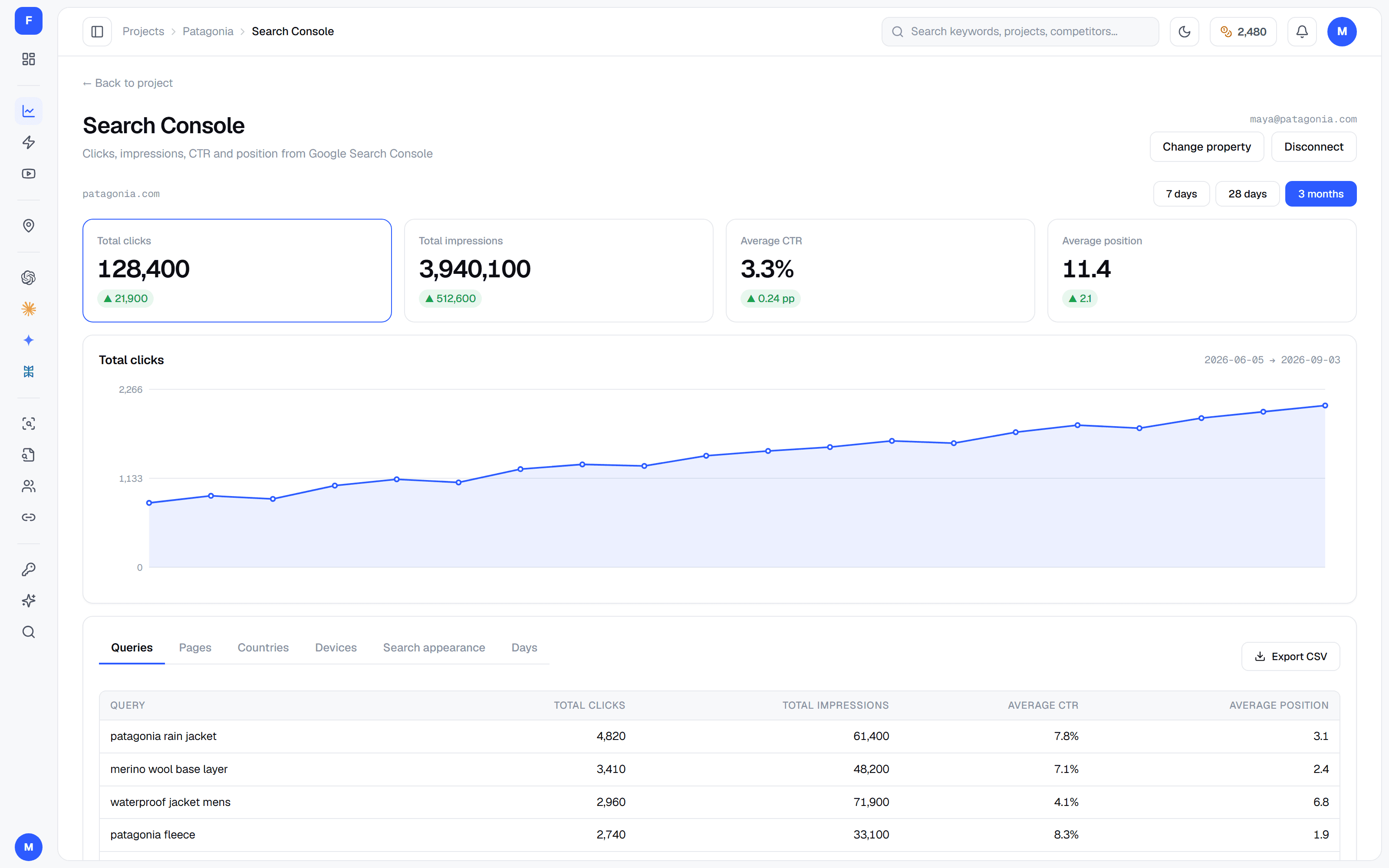
Link a Search Console property to any project and clicks, impressions and CTR sit beside the tracked position they belong to — so you can tell which rankings actually earn traffic.
An interactive example of the results screen. Click, toggle and drag — it works like the real tool.
Tick a second tile to compare two metrics. Position runs 1 at the top: lower is better.
| waterproof hiking bootsTracked | 8,522 | 105,210 | 8.1% | 2.8 | |
| trail running shoesTracked | 6,242 | 97,531 | 6.4% | 3.9 | |
| best rain jacketTracked | 5,521 | 131,452 | 4.2% | 6.4 | |
| merino base layer | 4,561 | 61,635 | 7.4% | 2.2 | |
| lightweight 2 person tent | 3,241 | 104,548 | 3.1% | 8.7 | |
| hiking boots women | 2,881 | 80,028 | 3.6% | 7.1 | |
| how to waterproof boots | 2,281 | 103,682 | 2.2% | 11.6 | |
| down jacket sale | 1,560 | 104,000 | 1.5% | 14.3 |
Open the Search Console screen — clicks, impressions, CTR and position with their change, the clicks trend and the query table.
Example data showing the tool's results screen — opens in a new tab.
One project per domain you track.
Connect the property that matches the project's domain.
Clicks, impressions and CTR sit beside the position you are tracking — over 7, 28 or 90 days, or a custom range.
A free service from Google that reports how your site performs in Google Search: the queries that show your pages, the clicks and impressions they earn, and whether your pages are indexed and healthy. FreeSERP reads its performance data and puts it beside your tracked rankings.
An impression is one appearance of your page in a search result; a click is someone choosing it. CTR is clicks divided by impressions. Average position is where your page appeared on average across all those impressions.
Search Console averages your position over every search, location and device that showed your page. A rank tracker checks one location and device at a time. Read them together: the tracked rank shows where you stand, Search Console shows what that is worth in clicks.
Sort the Queries table by position and look for queries just outside the top results — roughly positions 4 to 15 — with plenty of impressions. A small improvement there earns the most extra clicks. Send the best ones to the rank tracker and watch them move.
It shows Search Console's performance data — clicks, impressions, CTR and position. Index coverage, sitemap status and Core Web Vitals stay in Search Console itself; FreeSERP's Site Audit checks robots.txt, sitemaps and page speed from its own crawl.
A Google account with access to a verified Search Console property — a domain property or a URL-prefix property — covering the project's domain.
No. Connecting Search Console and reading its data cost nothing.
A ranking tells you where you appear. Search Console tells you whether that position earns clicks — together they show which rankings are worth defending.
Yes. The free plan covers Google rank tracking with 100 credits every month, refilled automatically, with no credit card. Every other tool comes with any paid plan, from $19/month for 2,000 credits, or any credit pack.
No. Every FreeSERP tool draws from the same credit balance. The free plan's credits cover Google rank tracking; everything else — the SERP checker, site audits, competitor analysis, keyword research, the keyword score checker, internal link analysis, AEO & GEO audits and Google Maps audits — needs a paid plan or a credit pack.
100 free credits every month for real-time Google rank tracking — for SEOs, marketers, and developers. Plans from $19/month add competitor intelligence and every other tool, paid for out of one balance.
Start Tracking for Free →