A complete SEO audit workflow in one place. Crawl every page and get one prioritised list of what is broken. Grade a single page against 63 checks. Put yourself beside the pages outranking you, map your internal links, and find the keywords worth writing for.
An interactive example of the results screen. Click, toggle and drag — it works like the real tool.
northpeak.com
Full website audit · crawls up to 1,000 pages
Example data
Crawl northpeak.com and audit every page it reaches
Technical health, content, speed, accessibility and security — page by page, then graded as one report.
WhoAudiences
Built for whoever has to fix it
Agencies
Audit a prospect's site before the pitch, and every client's on the same schedule. Exports drop into the report you already send.
In-house SEO
Turn a vague 'the site has issues' into a list with counts against it — and the comparison that says which fix moves a ranking.
Developers and owners
Find the broken links, the 4MB hero images and the pages nothing links to, without learning an SEO platform first.
ToolkitAudit & research
Seven tools, one SEO audit workflow
Crawl and index, on-page, architecture, competitors, rankings and content — in the order a full SEO audit runs, without a second subscription for each.
CrawlFull Website Audit
The whole site, graded and grouped
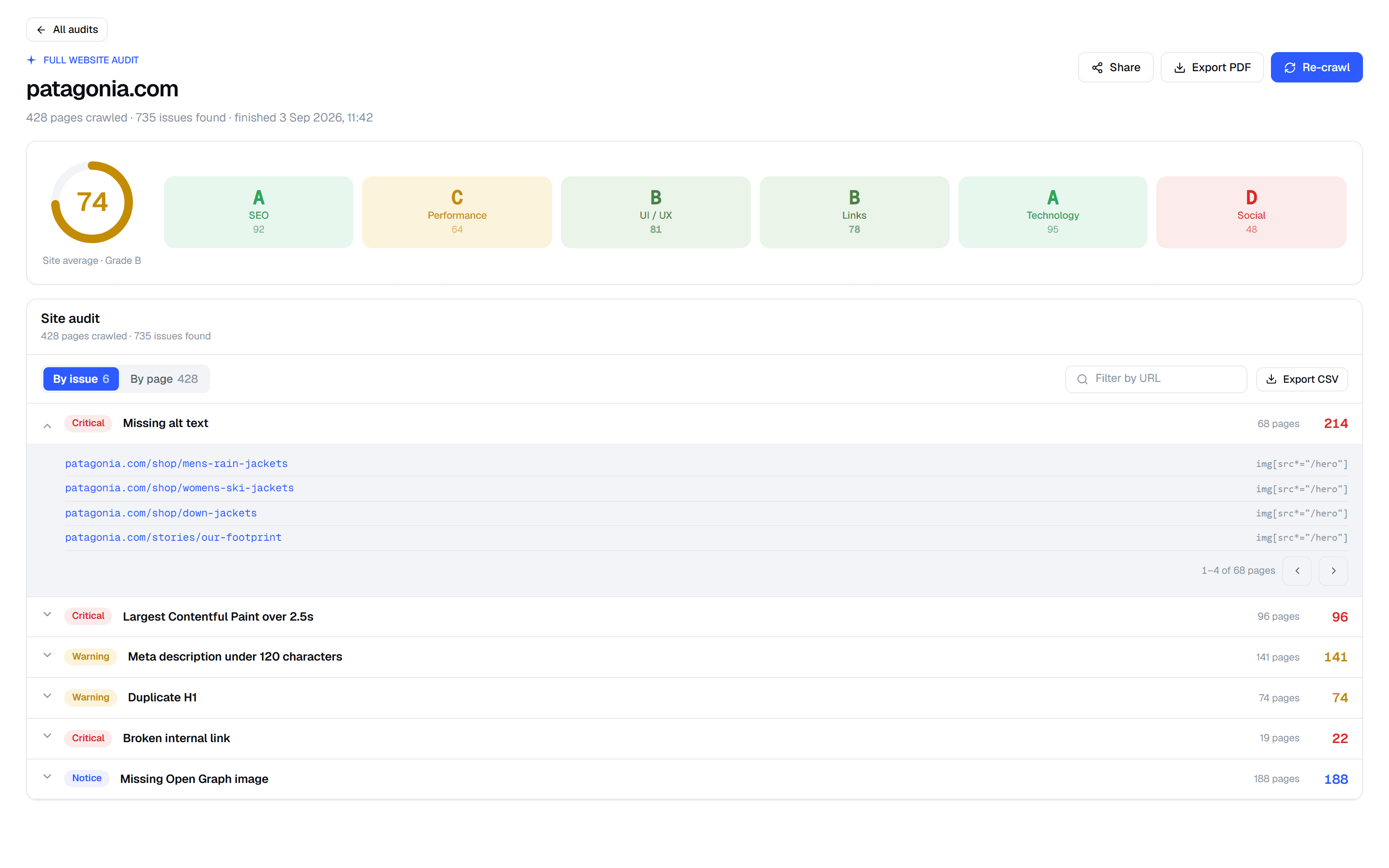
Where every SEO audit starts: can search engines reach, crawl and index your pages? Robots.txt, the XML sitemap, noindex tags, canonicals and HTTPS are read along the way, and when the crawl finishes it is a report, not a progress bar — one site average over six category grades, then every finding grouped by issue or page, with the URLs and the exact element behind each one.
app.freeserp.com — Full Website Audit
A site average, and a grade per category
Findings by issue, or by page, either way
Expand an issue for the URLs and the element
Share it, export PDF or CSV, re-crawl any time
AuditPage Audit
One page, 63 checks, graded
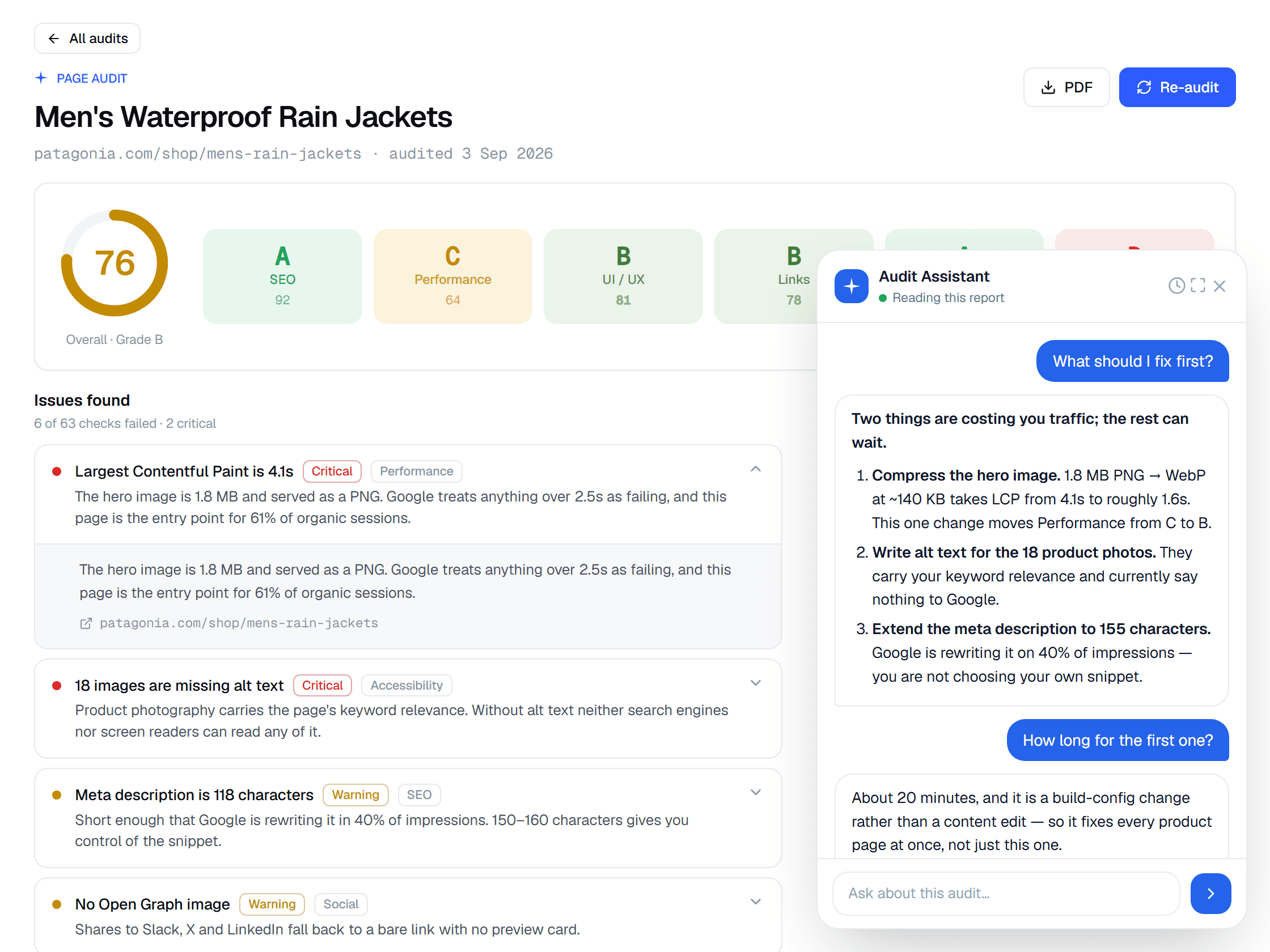
The on-page part of the audit, for the page you actually care about: titles, meta descriptions, headings, alt text, mobile viewport, tap targets, Core Web Vitals and more, scored end to end. Six category grades sit under one overall score, and every failed check says what it found, why it matters and where.
app.freeserp.com — Page Audit
SEO, Performance, UI/UX, Links, Technology and Social
Failures ranked Critical or Warning, each one explained
Ask the finished audit a follow-up question
PDF export · 5 credits an audit
CompareCompetitor Analysis
Your page against the ones ranking above it
The competitive audit, one keyword at a time. Pick a keyword and FreeSERP puts your page beside the pages beating you, scored on the same 63 on-page checks. Not a list of what they rank for — a column-by-column read of what they do differently on the page that outranks yours.
app.freeserp.com — Competitor Analysis
Your domain and the pages above it, side by side
Overall SEO score plus every check behind it
Title length, meta description, word count, keyword use
Share or export it · 25 credits an analysis
StructureInternal Link Analysis
See the link graph your site actually has
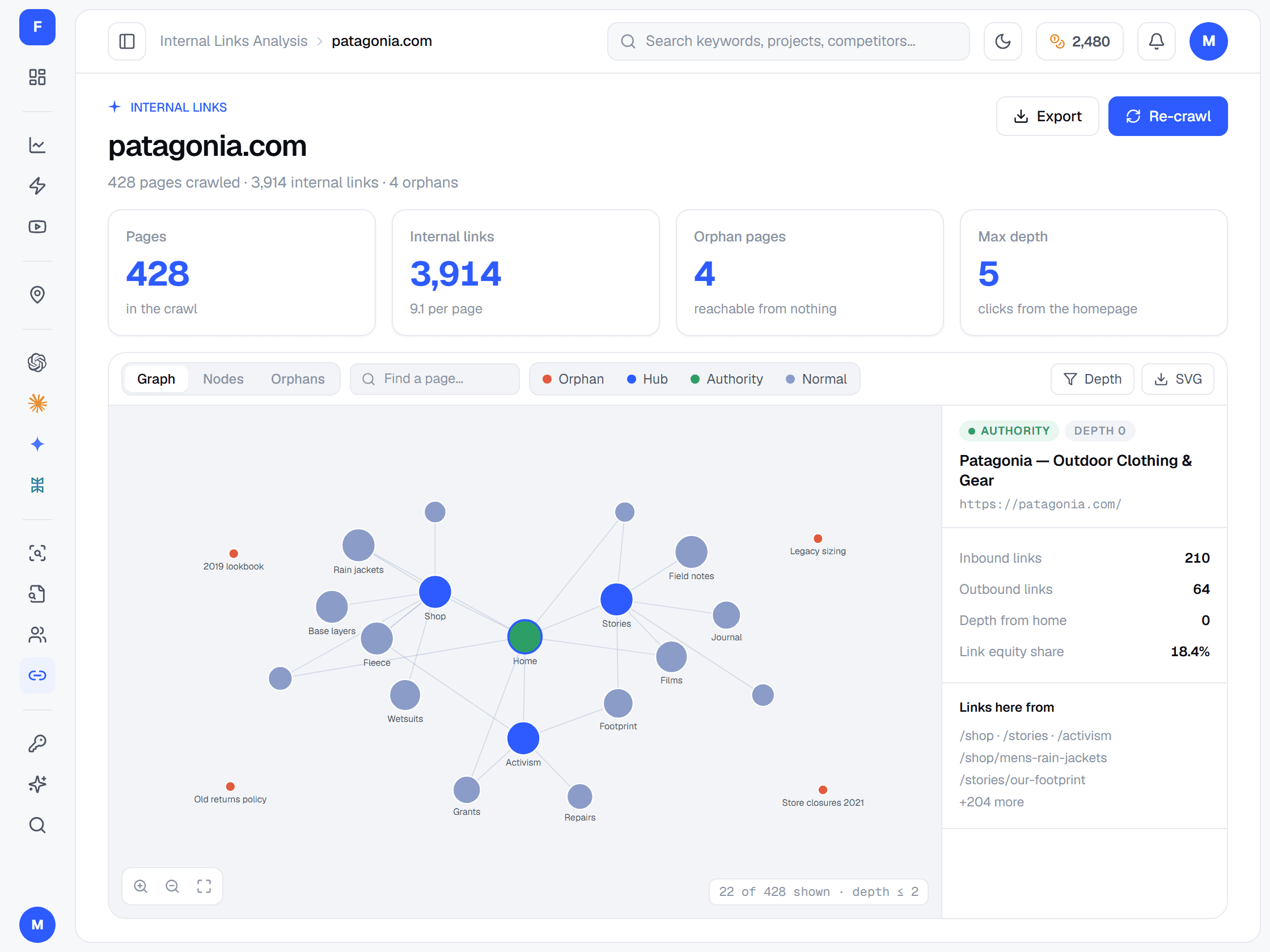
Site architecture, audited. Crawl the whole domain and get the internal link structure drawn out — which pages are hubs, which hold authority, how deep everything sits from the homepage, and which pages nothing at all links to.
app.freeserp.com — Internal Link Analysis
Pages crawled, internal links, links per page
Orphan pages — reachable from nothing — named
Depth from the homepage, and where equity pools
Inbound, outbound and equity share per page · 10 credits
TrackKeywords
Your whole portfolio in one table
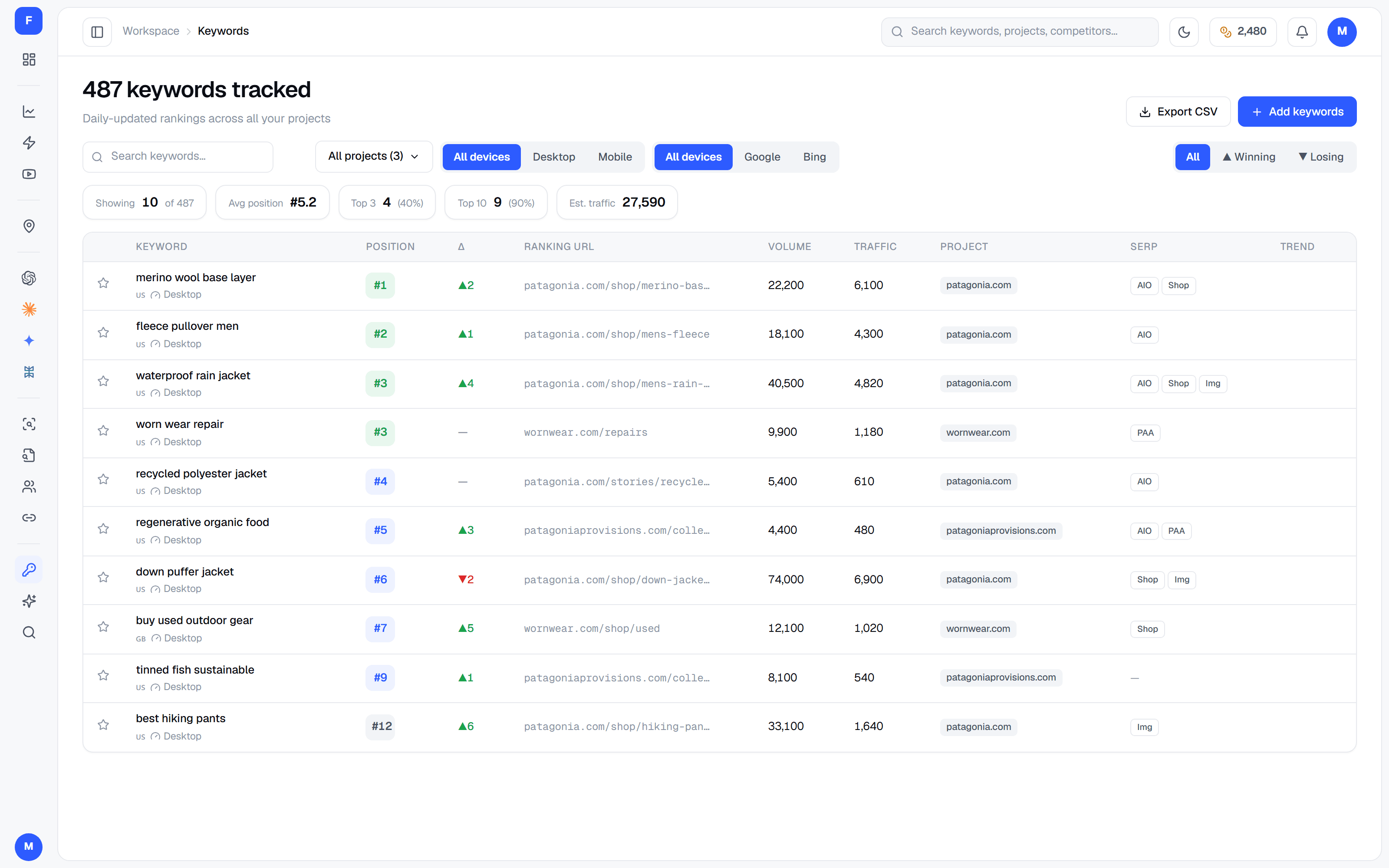
The rankings check in your audit. Every keyword you track, across every project, in one table — position, movement, search volume and the URL that ranks — so a page that is slipping shows up before the traffic does. Filter it, star the ones that matter, and export a CSV when the report is due.
app.freeserp.com — Keywords
Every project in one table, not one tab each
Position, movement, volume, traffic and ranking URL
Filter by project, device or engine; star and export
Adding a keyword is free · 5 credits a check
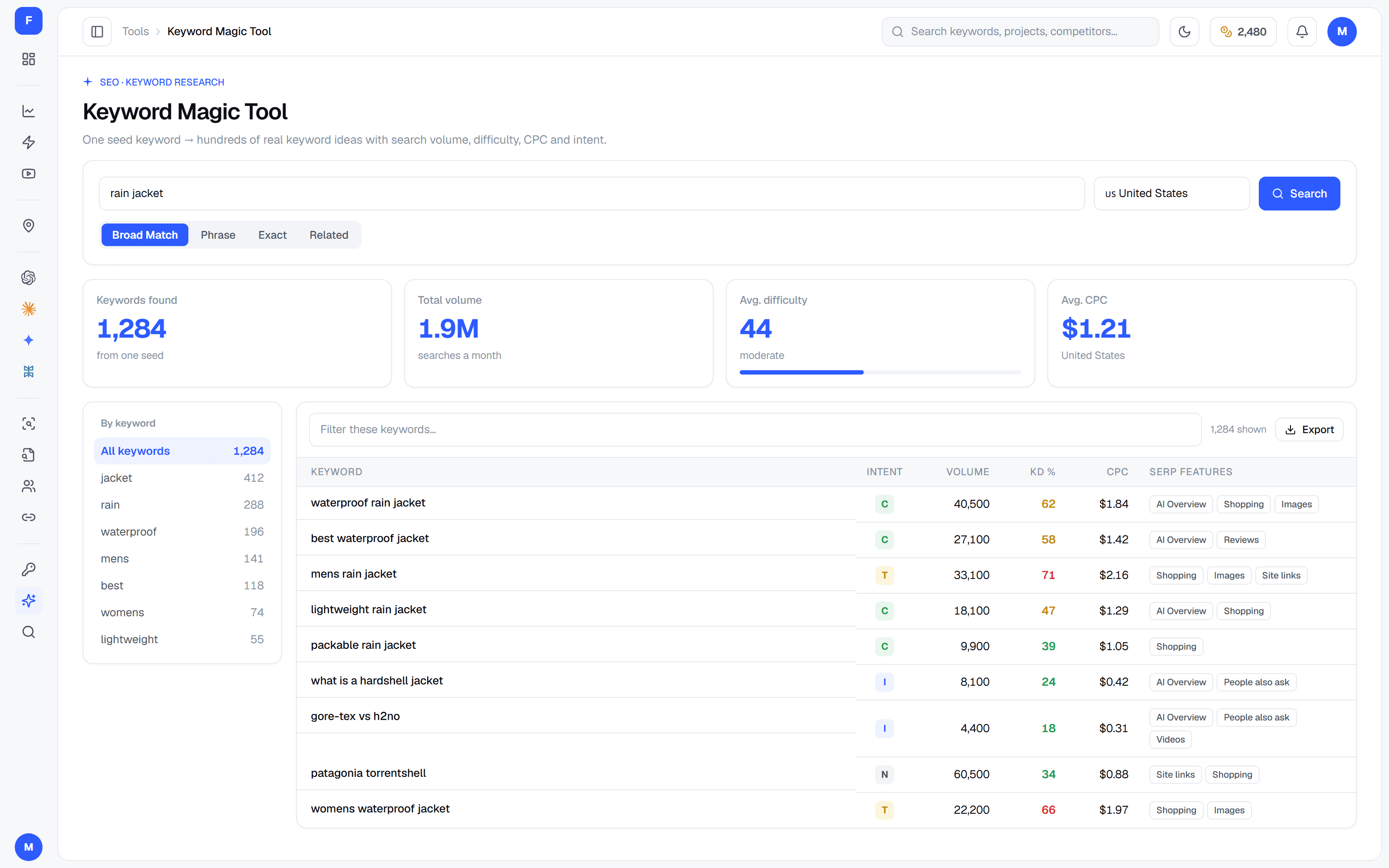
ResearchKeyword Magic Tool
One seed keyword, hundreds of real ones
Type a seed and get back keywords people actually search, with real volumes from a keyword database rather than a language model's guess — grouped by the words inside them, so a content plan falls out of the list.
app.freeserp.com — Keyword Magic Tool
Volume, difficulty, CPC and intent on every keyword
Broad, Phrase, Exact and Related match types
Word groups that carve a big list into topics
35 credits a search, 190 for the full page on paid
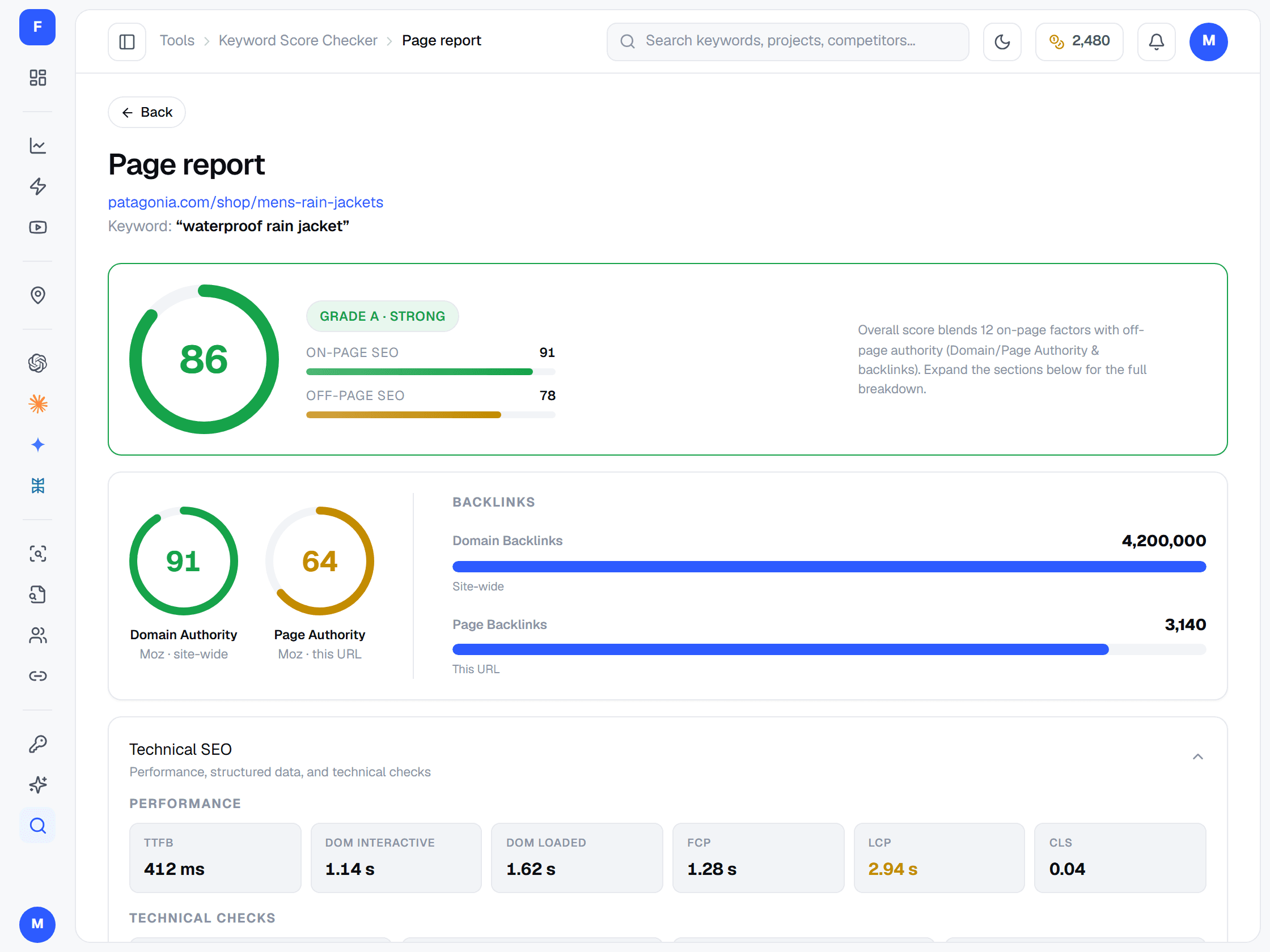
ScoreKeyword Score Checker
Score a page before you publish
No competitors, no crawl of the whole site — just your page and the term you want it to rank for. FreeSERP crawls it, runs it through PageSpeed and an authority lookup with backlink counts, and tells you how well the page is actually built for that keyword.
app.freeserp.com — Keyword Score Checker
One grade over on-page and off-page together
Domain and Page Authority, and the backlinks behind them
Real page speed — TTFB, FCP, LCP and CLS
15 credits a page
ChecksUnder the hood
Your SEO audit checklist, covered
Indexing, crawlability, security, on-page, mobile, speed, links and keywords — a crawl, a page audit, a link graph and a keyword lookup, between them, check all of this.
One balance covers every audit, analysis and keyword search — and the rank trackers too. Google rank tracking is free; any paid plan or credit pack unlocks the rest.
I dropped a $299/mo SEO tool the day I found FreeSERP. The free plan sold me in a week, and $19/mo covering rank tracking, audits and keyword research is a no-brainer.
Daniel CooperIndie SEO Consultant
The competitor gap report alone saved us weeks of manual research. We're now ranking on terms we didn't even know our rivals owned.
Liam ParkerGrowth Marketer
Daily rank tracking across 14 countries without touching a credit card. The CSV exports plug straight into our reporting stack.
Ethan RossSEO Operations Manager
FAQAnswers
Frequently asked questions
Anything not answered here — support@freeserp.com.
What is an SEO audit?
An SEO audit is a health check of everything that decides whether search engines can find, understand and rank your pages: whether they are crawled and indexed, how the site is structured, how each page is built, how fast and mobile-friendly it is, how it compares with the competition and where it ranks today. The point is not the report itself but a prioritised list of fixes.
What should a complete SEO audit checklist cover?
Indexing (are your important pages in Google at all), crawlability (robots.txt, XML sitemap, noindex and canonical tags), security (HTTPS and SSL), rankings and traffic, site architecture (internal links, orphan pages, crawl depth, URL structure), on-page SEO (titles, meta descriptions, headings, keyword use, alt text), content quality and freshness, mobile-friendliness, page speed and Core Web Vitals, backlinks and authority, and how you stack up against the pages ranking above you.
How do I run an SEO audit with the Audit Suite?
Start with the Full Website Audit to catch crawl, indexing, HTTPS and technical issues across the whole site. Run Internal Link Analysis to check architecture, crawl depth and orphan pages. Put your most important pages through the Page Audit for on-page, mobile and speed. Use Competitor Analysis on the keywords where you are close but not first, check where you rank in Keywords, and plan new or refreshed content with the Keyword Magic Tool and the Keyword Score Checker.
Which issues should I fix first?
Work from severity and reach. Critical findings come before warnings, and warnings before notices; an issue that touches hundreds of pages, or the pages that earn your traffic, beats a one-off. Anything stopping a page being crawled or indexed goes to the top, because no amount of on-page work helps a page Google cannot see. Grouping findings by issue in the site audit shows you that reach at a glance.
Does the audit check mobile-friendliness and Core Web Vitals?
Yes. The Page Audit checks the mobile viewport, tap target size and font size, runs PageSpeed for both mobile and desktop, and reports Core Web Vitals alongside load time and page size. Competitor Analysis and the Keyword Score Checker put the same speed figures beside your target keyword.
Does it look at backlinks?
Competitor Analysis and the Keyword Score Checker report domain authority, page authority and backlink counts to the domain and the ranking page, which is usually enough to tell whether authority is the gap holding a page back. It is an authority comparison rather than a link-by-link backlink audit.
Why include competitors in an SEO audit?
A technical audit tells you what is broken; a competitive audit tells you what is missing. A page can pass every check and still sit below a rival with deeper content, faster load times or more authority. Comparing yourself with the pages that outrank you shows which gap actually explains the ranking, so the fix list is ordered by what moves positions rather than by what is easiest to tick off.
What should I do after the audit?
Turn the findings into an action plan: group them by issue, decide what to fix first, and give each fix an owner. Export the report as PDF or CSV for whoever needs to sign it off. Once changes ship, re-crawl to confirm the issues are gone and watch the affected keywords in Keywords to see whether positions follow. Pages whose rankings keep sliding are the first candidates for a content refresh.
How often should I run an SEO audit?
Run a full crawl after any redesign, migration or large batch of new pages, and on a regular rhythm in between — monthly for sites that change often, quarterly for quieter ones. Audit individual pages before and after you edit them, and re-crawl any time you want to confirm a fix.
What do I get on the free plan?
Google rank tracking: projects, Google keywords, manual rank checks and rank history, with 100 credits every month for those checks and no credit card. Audits, competitor analysis, internal link analysis and keyword research are on paid plans from $19/month, or unlocked by buying any credit pack.
What does each tool cost in credits?
A website crawl is 5 credits a page, so 100 pages is 500. A page audit is 5 credits, and a follow-up question on it is 5 more. Competitor analysis is 25 an analysis, internal link analysis is 10 a crawl, the Keyword Score Checker is 15 a page, and the Keyword Magic Tool is 35 a search — 190 for the fuller result page on a paid plan.
How many pages will the site audit crawl?
Up to 1,000 in one crawl. It starts at the URL you give it and follows internal links outward with a real browser, so what it audits is what a visitor can actually reach.
Is the keyword data real or AI-generated?
Real. Search volume, difficulty and CPC come from a keyword database in a single lookup per search. AI is deliberately kept out of that part — it cannot know a real search volume, and a made-up one is worse than none.
What is the difference between Page Audit and Keyword Score Checker?
Page Audit grades a page on its own merits across 63 checks in six categories. The Keyword Score Checker scores that same page against one target keyword, including page speed and an authority lookup — it answers 'is this page built to rank for this term', not 'is this page healthy'.
Do I need a credit card to start?
No. The free plan needs no card. Paid plans start at $19/month for 2,000 credits and can be cancelled at any time — email support@freeserp.com if you want a hand sizing one.